The robots.txt mistake that blocked Google in plain sight
In May 2026, freelance SEO consultant Jan Caerels watched one of his tracked client sites get flagged: Google Search Console reported the entire domain as blocked from crawling. The robots.txt file looked fine to a human reader. A popular browser-based robots.txt tester returned “allowed”. And yet Google was right — the site really was blocked.
How Google reads it differently
The file ended with two sections. One was commented as “Bots with crawl delay” and listed pairs like User-agent: bingbot followed by Crawl-delay: 5, repeated for a handful of crawlers. Tucked inside that list was User-agent: * with Crawl-delay: 10. The second section, “Blocked bots”, opened with User-agent: amazonbot and Disallow: /, then a few more entries in the same shape.
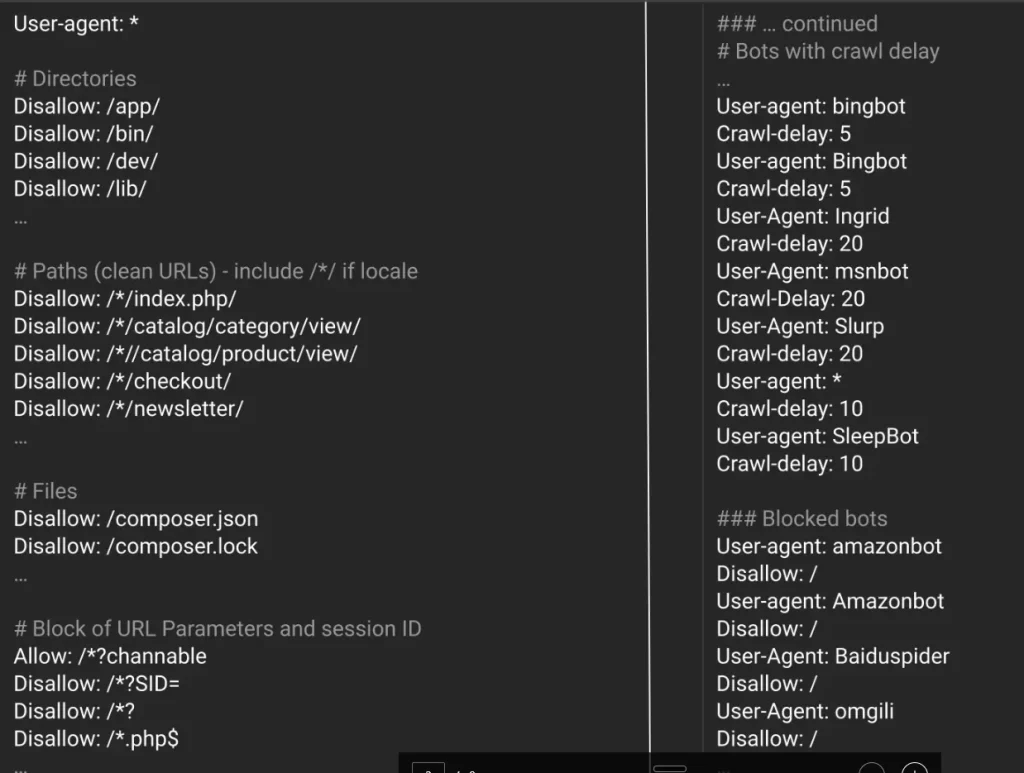
To a human, that wildcard line reads as its own group: every bot gets a 10-second crawl delay, and that is the end of it. Google reads it differently. Per RFC 9309 — the Robots Exclusion Protocol RFC that Google co-authored — consecutive User-agent lines with no rules between them form a single group, and whatever rule comes next applies to all of them.
The trap is that Google does not honor Crawl-delay. It is a de-facto extension, not part of the RFC, and Google’s parser drops it. With those lines effectively erased, the file collapses into one long run of User-agent declarations with no rule in between — until the first valid directive lower down. That directive is Disallow: /.
Here is roughly what Google sees after stripping Crawl-delay:
User-agent: bingbot
User-agent: Bingbot
User-agent: Ingrid
User-agent: msnbot
User-agent: Slurp
User-agent: *
User-agent: SleepBot
User-agent: amazonbot
Disallow: /
One group. One rule. Disallow: / applies to every user-agent in that run, including the wildcard. The entire site is blocked for Googlebot.
Why the tester said allowed
Most robots.txt testers treat Crawl-delay as a real directive, because for plenty of other crawlers it is one. In their world, the wildcard sits in its own neat little group with a crawl delay of 10, sealed off from the Disallow: / several lines below. The tester is simulating a parser that does not match Google’s, and on a file like this the two parsers disagree on the most important question you can ask robots.txt: is the site crawlable.
That is the uncomfortable part. The tool you reach for to validate your robots.txt is, in this exact case, lying to you with full confidence. Search Console was right; the tester was wrong.
Silent breakages need continuous eyes
This is the failure mode we built Wygard for. The file deploys clean. The tester gives a green light. Nobody opens robots.txt again for weeks because there is no reason to. Meanwhile, Google quietly stops crawling, rankings drift, and organic revenue erodes — slowly enough that nobody connects the dots until much later.
The consultant in the opening caught it within hours because he runs continuous tracking on robots.txt across his client sites. Humans miss things. Crawlers don’t. A file that passes every eyeball review can still be silently broken in production, and the only reliable defense is having something that re-reads it every day and tells you the moment the answer changes.
Rank protection, on quiet duty
We watch the on-page SEO settings that actually break rankings — robots.txt, canonical tags, meta robots, titles, structured data — and alert you within hours when they shift. You can start a Wygard account and have your money pages on continuous monitoring this afternoon. We spot, you fix. Your robots.txt may be fine today. Trust, but verify.
